deepmatch has an MCP server. Connect it to whichever assistant you already talk to, ask it
to build your profile, and it writes what it has learned about you straight in - no form,
no copying a block of JSON between two tabs.
Then say this
Once it is connected, just say it: "build my deepmatch profile". The connector
tells your assistant what the steps are and what order they go in, so you do not have to.
It reads what is already on file, adds what is missing, and tells you what it wrote.
Some clients also list build_my_deepmatch_profile in the connector's own menu. If
yours does not, asking in words does exactly the same thing.
It can only ever reach your own profile. Everything it writes is listed in your settings,
and you can delete any of it.
1
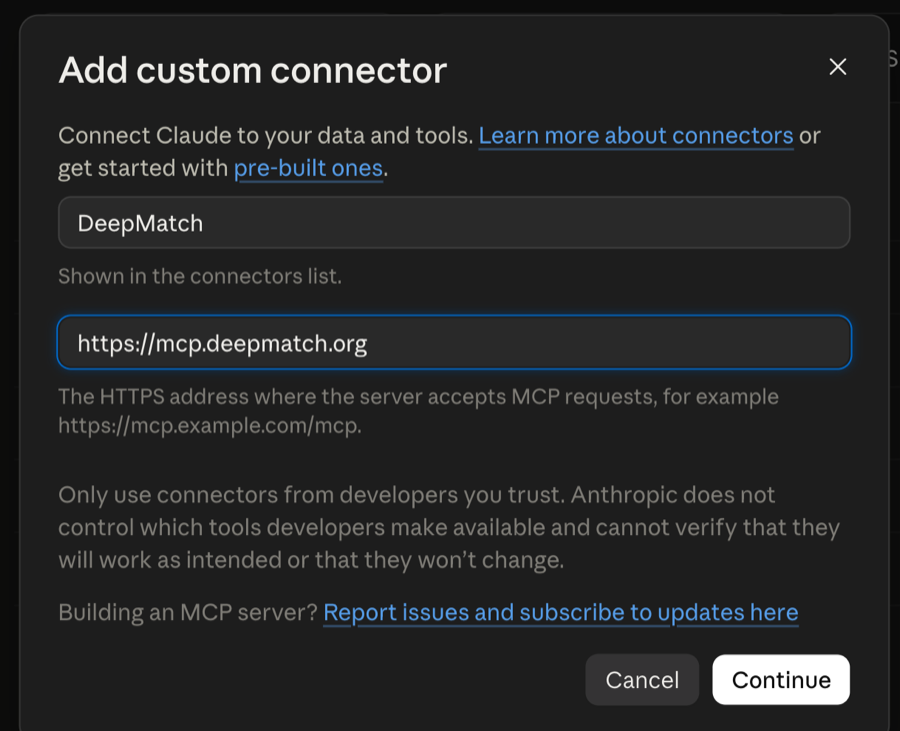
Claude, in the browser or the desktop app
Open the dialog with the button below - it takes you straight there.
Call it whatever you like, and paste the address.
Continue. deepmatch registers itself and asks you to approve it; you are already signed in, so there is no login form.
There is no single "install" link that works everywhere - the command line clients take a
command and the web ones take a URL in a settings pane, so this page gives you whichever
one your assistant actually wants rather than a button that does nothing in three places
out of four.